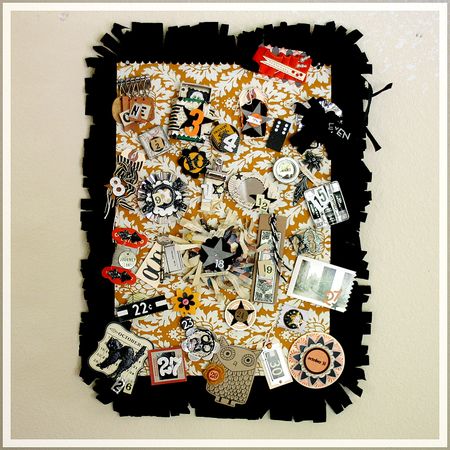
It took me part of an evening, but my
December Art Journal is put together and ready to go.

I'll be sharing my art journal/mini book here as well as guiding you through a few tutorials. Hold on... it'll be a long post.
If you don't have any of these supplies, feel free to substitute with anything in your stash! Make it yours!
Note: When I'm assembling my book I make sure that I put envelopes or folders or anything that can hold a lot of stuff in places where I'll need it. For example, I make sure that I have an envelope for the 16th (my son's birthday) where I'll potentially have more things that I'll want to include. I also make sure I have a folder or large paper on the 25th and other days where I'll have gatherings.
I move my papers around a lot and put my numbers on at the very end. You could also keep your numbers off and just add them on the day... giving you even more time to move your pages around before commiting!
So, here's what I did to create the foundation pages for my book.
Supplies:- December Art Journal kit
- cardstock
- sewing machine
- embroidery thread and needle
- circle hole punch
- scallop border punches
- star punch
- page protector
- zig zag scissors
- wax paper
*Don't throw our your packaging... we'll be using that too.
Cover and back.
Take your 5x7 chipboard piece and punch two holes in it for your binder rings. Use this as a template for the other holes you will punch as you construct this book. Using the back cover as a template punch the holes in your bingo card for your cover. Trim a piece of ribbon and sew down the side.
Pocket page for extra supplies (I had supplies from the kit that I'll only use as I fill up my pages and wanted to store them together).

Take extra cardstock and trim it to 5x7. Using a scallop punch (or freehand it with scissors) punch one 5" end. Take a coordinating piece and trim it to 4.5x5". Punch a half circle on one of the 4.5" sides. Sew onto the larger cardstock as shown. Store extra stickers, die-cuts, etc.
Page 1.

(note: for most of the pages that made use of the 6x6" patterned paper sheets in the kit I trimmed them down to 5" wide). Trim your music note paper down to 5x6".
Page 2.

Take a piece of copy paper. Fold it in half. Draw a bracket shape like this { on the paper. Cut it out and unfold. Use extra cardstock from your stash. Place your newly cut bracket shape on your cardstock. Trace and cut out.
Page 3.

Take an extra page protector. Trim to 5x7" and sew down the side, creating a small page protector. Trim a 1" piece off one of your 6x6" patterned papers and place in the side of the page protector. Sew an additional line down the other side of the patterned paper, essentually making a tall and skinny pocket for it. For now I just slide my "3" into the page protector.
Page 4.

Another piece of patterned paper trimmed to 5x6". Staple a small piece of ribbon to the top.
Page 5.

Trimmed your vintage book page to 5x7".
Page 6.

Trim the glitter dot patterned paper to 5x6". Use a scallop punch down the side.
When I use my scallop punch I punch first and THEN trim my paper down to size (5"). Doing it the other way around will result in a page that's slightly less than your desired size.
Page 7.

The misted paper.
Page 8.

Take two pieces of cardstock from your stash. One measuring 5x6", the other measuring 4x5" (with a scalloped edge). Sew a pocket like you did earlier.
Page 9.

Take a sheet of white cardstock from your kit. Take the 1" piece of music note paper that your trimmed off earlier and adhere it to the side. Take a piece of ribbon and stitch it on the seam.
Page 10.

Ledger patterned paper with a small ribbon stitched to the top side.
Page 11.

Staple the chipboard star to the edge of the 4x6" transparency.
Page 12.

Stitch another piece of ribbon to the side of the kraft cardstock.
Page 13.

Grid paper.
Page 14.

Use your scallop punch on the side of a piece of patterned paper. Thread yarn through the holes in the punched edge.
Page 15.

Hand cut a scallop down the side of a sheet of the white cardstock. Take embroidery thread and stitch random lines going down.
Page 16.

Adhere your artisan die-cut to the envelope so that it's partly covered by the flap when closed.
Page 17.

Tag
Page 18.

Using a zig zag scissor trim the side of a 5x7" piece of cardstock. Punch or hand-cut three stars out of cardstock. Sew down the side.
Page 19.

Take your large chipboard frame from the kit. Take your plastic packaging from the frame and cut it down the side. Stick your chipboard frame to the plastic. Trim around to create a "window page". Adhere your number directly to the plastic.
You may have noticed that I leave the back side of all my pages. It does not bother me to have them blank and unfinished. I figure that I can always cover them with photos... or just leave them. If you're concerned about having things look unfinished you can back them with additional paper or embellishments.
Page 20.

Scallop the edge of the large dot patterned paper.
Page 21.


Create your own glassine envelope with wax paper. Take a piece of wax paper and trim it to about 11.5x5" (you can do this right in your paper trimmer). Fold it so that you have an envelope that's 51/4" tall. Sew the edges. Fold over your flap and angle the corners with a scissor. For now I just threw an extra punched star in it.
Page 22.

Loose leaf page.
Page 23.

Red envelope
Page 24.

Trim one of your white cardstock pages with a scallop punch. Stitch a random line down the side.
Page 25.

File folder page.
Page 26.

Take a 1x6" piece of patterned paper and adhere to the side of a piece of white cardstock (5x6"). Stitch a piece of ribbon down the seam.
Page 27.

Snowflake transparency page (trimmed to 5x6")
Page 28.

Take your fabric and trim to 6x5". Stitch to an extra piece of cardstock (for strength) and zig zag the edge.
Page 29.

Take the grid chipboard back from your frame packaging. Trim to 5x7". Machine stitch onto cardstock (to hide the barcode, etc. on the back).
Page 30.

Using your zig zag scissors trim the edge of the candy cane striped patterned paper.
Page 31.

Hand-cut a scallop on the top of the circle dot patterned paper.
Gather up all your pages and add your binder rings.
Voila. Your foundation pages are done!
I'm determined to get my printer going and update daily progress on my blog in December but we'll see. If not, then I plan to print out any pictures I want to use on a weekly basis. I'm not at ALL set on taking a picture a day. Some pages may just be words or ephemera.
So.
Now... the giveaway.
How will you be recording the holidays? Are you making a December journal?
I'll draw a RAK from the comment section on this post at the beginning of next week.


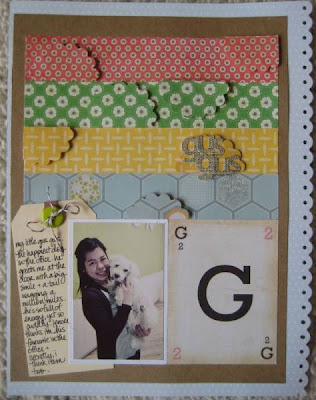 Problem is, in the original photo I had a piece of hair sticking out that drove me nuts. See?

 3. Choose an area of the photo that you want to 'clone' to cover up the item. In other words, for this picture, I wanted to clone the background. (If this makes no sense, hopefully these next few pictures will explain it.) Do this by putting your cursor over the area you want to clone and holding down ALT. Your circle should turn into a 'target' (basically a circle with a plus sign in it). Click once.


 i followed this tutorial, with the exception that i used actual cork board instead of batting. i had an old corkboard kicking around that i had brought with me from my childhood bedroom when we first got married. i have no idea to this day why i kept the thing for so long, but it worked perfectly for this project. i cut the cork to fit the inner hoop snugly and didn't bother using anything to hold it in place. i also didn't glue the fabric to the cork, i just used a staple gun. i chose to do it this way just in case i wanted to swap out the fabric sometime down the road - i was scared if it was glued on, it wouldn't come off as easily.


 Step 2: Outline your title. This is where you determine how thick or thin you want your title to be.
 Step 3: Cut your title. Don't worry about it being perfect! I think half the fun of hand-cut titles are that they're supposed to look hand cut.
 Step 4: Once I finish cutting it out, I usually erase all my pencil marks. I then go back and make new marks for letters that usually have an empty space - e, o, l, p, etc. These marks show where I'm going to cut next.


 This last title was cut from Hambly Rub-Ons, making it super tricky. I ended up adhering it to plain white paper so I could use pop-dots underneath to make it stand out.

 I can totally see my kids looking forward to every new "ornament"!